


Ubuntu日本語フォーラム
ログインしていません。
下記のような不具合を発見して、その回避方法を探していて挫折しました。
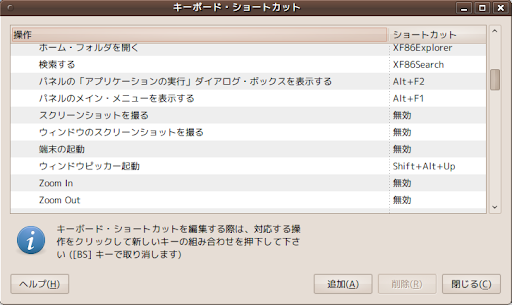
gnome- keybinding-propertiesがAlt+PrintをAlt+Excuteと誤認する
https://bugs.launchpad.net/ubuntu-jp-improvement/+bug/543285
やとうとしていることはGnomeデスクトップ環境でAlt+Printを押下した際の動作を変更することです。
(上記報告ではgeditを割り当てましたが、けっしてgeditを起動したい訳ではありません。)
環境はKarmicまはたLucid Beta-1です。
私自身はXfce4ユーザなので、とくに困っている訳ではありません。興味本位です。
それなら知っている、あるいは興味をもっった方がいらしたら御回答いただければ幸いです。
私がやってみたのは
gnome- keybinding-propertiesで
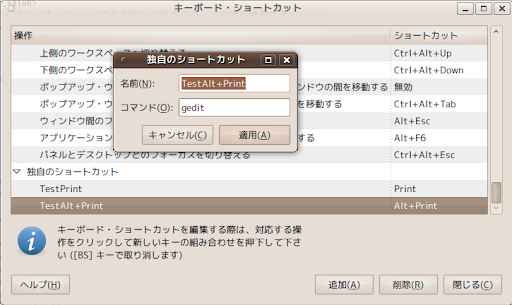
・とりあえず,Alt+Excuteでコマンド登録
・デフォルトの動作である、「ウィンドウのスクリーンショットを撮る」のショートカットを無効にする
(ショートカットの列をクリックしてBackspeceで無効に出来ます)
・gconf-editorを起動して /desktop/gnome/keybindings/custom1 の
bindingを"<Alt>Excute"から"<Alt>Print"に変更する。
上記では達成できませんでした。
参考 上記設定終了後の状態
$  gconftool-2 -R /desktop/gnome/keybindings
 allowed_keys = []
 /desktop/gnome/keybindings/magnifier:
  binding =
  name = 拡大鏡を起動または停止する
  action = gconftool-2 --toggle /desktop/gnome/applications/at/screen_magnifier_enabled
 /desktop/gnome/keybindings/custom0:
  binding = Print
  name = TestPrint
  action = gedit
 /desktop/gnome/keybindings/custom1:
  binding = <Alt>Print
  name = TestAlt+Print
  action = gedit
 /desktop/gnome/keybindings/screenreader:
  binding =
  name = スクリーン・リーダの切り替え
  action = gconftool-2 --toggle /desktop/gnome/applications/at/screen_reader_enabled
 /desktop/gnome/keybindings/onscreenkeyboard:
  binding =
  name = オンスクリーン・キーボードを起動または停止する
  action = gconftool-2 --toggle /desktop/gnome/applications/at/screen_keyboard_enabled
オフライン

この挙動としてよく分からない現象が起こりました。
「ウインドウのスクリーンショットを撮る」に「Alt+Execute」を指定→動作する
「独自コマンド(geditを実行)」に「Alt+Execute」を指定→動作しない
「独自コマンド(geditを実行)」に「Alt+J」などを指定→動作する
「Alt+Execute」が、状況によって動作したりしなかったりです。
オフライン
MidSpecLowLoad による投稿:
やとうとしていることはGnomeデスクトップ環境でAlt+Printを押下した際の動作を変更することです。
(上記報告ではgeditを割り当てましたが、けっしてgeditを起動したい訳ではありません。)
環境はKarmicまはたLucid Beta-1です。
GNOMEではなくMetacityでやってしまう、という反則技でもよいですか?
環境:
Ubuntu 9.10
ならびに
Ubuntu 10.04 beta 1 desktop ライブCD
確認方法:
Alt+PrintScreen押下
↓
スクリーンショットのダイアログが出る(既定の動作)
↓
gconftool -s /apps/metacity/global_keybindings/run_command_1 --type string '<Alt>Print'
gconftool -s /apps/metacity/keybinding_commands/command_1 --type string 'zenity --info --text hoge'
↓
Alt+PrintScreen押下
↓
zenityのダイアログが出る
STGSAGWAN さん
引っかかっていた事が解決してすっきりしました。ありがとうございます。
オフライン

2007年10月11日以降の投稿は、クリエイティブ・コモンズ-表示-継承-3.0 (Cc-by-sa-3.0)で提供されます。
著作権等の他者の権利を不当に侵害するような投稿、特定の個人や団体などへの誹謗中傷を含む投稿、個人情報を含む投稿など、違法性のある投稿は行わないでください。
Ubuntu and Canonical are registered trademarks of Canonical Ltd.