


Ubuntu日本語フォーラム
ログインしていません。
こんにちは、
LaTeXファイルをemacsとAucTeXで書こうと思っています。が、アクサンシルコンフレックスを書くための方法をよく分かっていない。
http://osdir.com/ml/help-gnu-emacs-gnu/2009-08/msg00170.htmlによれば、(load-library "iso-transl")を加えるべきで、確かに「ê」、「â」、「û」などをかくことができました。しかし、「^」だけを入力することはできません。たとえば「3^{2}」を書けない。
かなりこまりますから、誰かがemacsで「^」を書くための解決がありましたら、教えてもらえませんか。
オフライン
返信してありがとうございます。
実はサーカムフレックスを入力すると、emacsのバッファーの中に現れないのです。つまり「^」を押すと、バッファーに出ない。
しかし、端末の中に「emacs -nw」では「^」を押すと「^」が出る。
もっと詳しい説明を欲しかったらお知らせください!
オフライン

LaTeX的には、アクセント類は
\`o
\"o
\.o
\H{o}
\d{o}
\^{o}
etc..
などで指定できるかと思います。
http://osdir.com/ml/help-gnu-emacs-gnu/2009-08/msg00170.html
での話はLaTeXでは無く、普通に非ASCII文字としてアクセント付き文字を入力する方法についての議論のような気がします。
emacsのAucTeX Mode(TeX Mode?)で無い状態では、
^
は入力できるのでしょうか。
.emacs等でのフォント設定はどのようになっていますか。
alex86 による投稿:
もっと詳しい説明を欲しかったらお知らせください!
なにがしたいのか、そちらでの状況がどうであるのか、設定状況はどのようになっているか、調査したことがあればその内容および参照サイト等々詳しい説明をしていただかないことには、なかなか的確フォローは付かない(状況が伝わらないことには付けられない)ので、質問内容を読み直して、足りない部分を補足する形でもう一度説明しなおしてみて下さい。
オフライン
LaTeX的なアクセントをよく知っていますが、「^」を押すと現れません。
次のファイルは、私のinit.elです:
;;##################################################################################################
;;##################################################################################################
; LaTeX
;;##################################################################################################
; ------------------------------------------------------------------------------------------------------------------
;; lancer AucTeX etc
; ------------------------------------------------------------------------------------------------------------------
(require 'tex-site)
(require 'latex)
(require 'tex)
(require 'tex-style)
; ------------------------------------------------------------------------------------------------------------------
;RefTeX
; ------------------------------------------------------------------------------------------------------------------
(require 'reftex)
(autoload 'reftex-mode "reftex" "RefTeX Minor Mode" t)
(autoload 'turn-on-reftex "reftex" "RefTeX Minor Mode" nil)
(autoload 'reftex-add-to-label-alist "reftex" "RefTeX Minor Mode" nil)
(if window-system (require 'font-latex))
(autoload 'turn-on-bib-cite "bib-cite")
(add-hook 'LaTeX-mode-hook 'turn-on-reftex)
(add-hook 'LaTeX-mode-hook 'turn-on-bib-cite)
(add-hook 'LaTeX-mode-hook
(function
(lambda ()
(turn-on-auto-fill)
(define-key LaTeX-mode-map '(f9) 'TeX-command-master)
(define-key LaTeX-mode-map '(f10) 'TeX-next-error)
(define-key LaTeX-mode-map '(f12) 'TeX-toggle-debug-boxes)
(define-key LaTeX-mode-map '(control C) 'reftex-citation)
(define-key LaTeX-mode-map '(control R) 'reftex-reference))))
(setq-default
bib-bibtex-env-variable "BIBINPUTS"
bib-cite-use-reftex-view-crossref t
reftex-texpath-environment-variables
'("!kpsewhich -show-path=.tex" "TEXINPUTS")
reftex-bibpath-environment-variables
'("!kpsewhich -show-path=.bib" "BIBINPUTS")
reftex-plug-into-AUCTeX t
reftex-save-parse-info t
reftex-enable-partial-scans t
reftex-insert-label-flags '(t t)
reftex-enable-partial-scans t
reftex-save-parse-info t
reftex-use-multiple-selection-buffers t
reftex-plug-into-AUCTeX t
reftex-label-alist
'(("thm" ?h "th:" "~\\ref{%s}" nil ("thm" "th."))
("defn" ?d "def:" "~\\ref{%s}" nil ("defn" "def."))
("lem" ?l "lem:" "~\\ref{%s}" t ("lem" "lem.")))
TeX-view-style '(("." "xdvi %d")))
; ------------------------------------------------------------------------------------------------------------------
; To turn on RefTeX Minor Mode for all LaTeX files, and other
; ------------------------------------------------------------------------------------------------------------------
(add-hook 'LaTeX-mode-hook 'turn-on-reftex) ; with AUCTeX LaTeX mode
(add-hook 'LaTeX-mode-hook
'(lambda ()
(setq TeX-open-quote "«~")
(setq TeX-close-quote "~»")
(auto-fill-mode t)
))
(add-hook 'Tex-mode-hook
'(lambda ()
(setq TeX-open-quote "«~")
(setq TeX-close-quote "~»")
(auto-fill-mode t)
))
; ------------------------------------------------------------------------------------------------------------------
;pour accélerer RefTeX:
; ------------------------------------------------------------------------------------------------------------------
(setq reftex-enable-partial-scans t)
(setq reftex-save-parse-info t)
(setq reftex-use-multiple-selection-buffers t)
(setq reftex-plug-into-AUCTeX t)
(add-hook 'reftex-load-hook 'imenu-add-menubar-index)
(add-hook 'reftex-mode-hook 'imenu-add-menubar-index)
; --------------------------------------------------------------------------------------------------------------
; lance le folding
; --------------------------------------------------------------------------------------------------------------
(load "tex-fold.el" nil t t)
; ------------------------------------------------------------------------------------------------------------------
; lance preview-latex
; ------------------------------------------------------------------------------------------------------------------
(load "preview-latex.el" nil t t)
; ------------------------------------------------------------------------------------------------------------------
; Smart quotes
; ------------------------------------------------------------------------------------------------------------------
(setq TeX-open-quote "<<")
(setq TeX-close-quote ">>")
; ------------------------------------------------------------------------------------------------------------------
; Wrapping the region in double quotes
; ------------------------------------------------------------------------------------------------------------------
(defadvice TeX-insert-quote (around wrap-region activate)
(cond
(mark-active
(let ((skeleton-end-newline nil))
(skeleton-insert `(nil ,TeX-open-quote _ ,TeX-close-quote) -1)))
((looking-at (regexp-opt (list TeX-open-quote TeX-close-quote)))
(forward-char (length TeX-open-quote)))
(t
ad-do-it)))
(put 'TeX-insert-quote 'delete-selection nil)
; ------------------------------------------------------------------------------------------------------------------
; Inserting and wrapping single quotes
; ------------------------------------------------------------------------------------------------------------------
(defun TeX-insert-single-quote (arg)
(interactive "p")
(cond
(mark-active
(let ((skeleton-end-newline nil))
(skeleton-insert
`(nil ?` _ ?') -1)))
((or (looking-at "\\<")
(looking-back "^\\|\\s-\\|`"))
(insert "`"))
(t
(self-insert-command arg))))
(add-hook 'LaTeX-mode-hook
'(lambda ()
(local-set-key "'" 'TeX-insert-single-quote)))
; ------------------------------------------------------------------------------------------------------------------
; Autopairs
;see http://autopair.googlecode.com/svn/trunk/autopair.el
; ------------------------------------------------------------------------------------------------------------------
(add-to-list 'load-path "/home/freeman/.emacs.d/lisp")
(require 'autopair)
(autopair-global-mode) ;; to enable in all buffers
;see http://www.emacswiki.org/emacs/AutoPairs#Discussion
; -------------------------------------------------
(setq skeleton-pair t) ; enable pairing
(defun quoted-parentheses (arg)
(interactive "P")
(if (looking-back "\\\\")
(skeleton-insert '(nil "(" _ "\\)") -1)
(skeleton-pair-insert-maybe arg)))
(defun quoted-brackets (arg)
(interactive "P")
(if (looking-back "\\\\")
(skeleton-insert '(nil "[" _ "\\]") -1)
(skeleton-pair-insert-maybe arg)))
(global-set-key "(" 'quoted-parentheses)
(global-set-key "[" 'quoted-brackets)
; ------------------------------------------------------------------------------------------------------------------
; master file
; ------------------------------------------------------------------------------------------------------------------
(setq-default TeX-master nil)
TeX-master nil
; ------------------------------------------------------------------------------------------------------------------
; Abbrev mode and AUCTeX
; ------------------------------------------------------------------------------------------------------------------
(add-hook 'TeX-mode-hook (lambda ()
(setq abbrev-mode t)
(setq local-abbrev-table TeX-mode-abbrev-table)))
; ------------------------------------------------------------------------------------------------------------------
;Whizzytex
; ------------------------------------------------------------------------------------------------------------------
;uncomment to enable it
;(autoload 'whizzytex-mode
; "whizzytex"
; "WhizzyTeX, a minor-mode WYSIWIG environment for LaTeX" t)
; ------------------------------------------------------------------------------------------------------------------
;LaTeX-math and other usefull stuff
; see http://www.emacswiki.org/emacs/AUCTeX
; ------------------------------------------------------------------------------------------------------------------
(add-hook 'LaTeX-mode-hook 'LaTeX-math-mode)
(add-hook 'LaTeX-mode-hook 'auto-fill-mode)
(add-hook 'LaTeX-mode-hook 'flyspell-mode)
; ------------------------------------------------------------------------------------------------------------------
;cdLaTeX
; ------------------------------------------------------------------------------------------------------------------
; (add-hook 'LaTeX-mode-hook 'turn-on-cdlatex) ; with AUCTeX LaTeX mode
; (autoload 'cdlatex-mode "cdlatex" "CDLaTeX Mode" t)
; (autoload 'turn-on-cdlatex "cdlatex" "CDLaTeX Mode" nil)
;--------------------------------------------------------------------------------------------------
; completion, style file, or multi-file stuff work
;--------------------------------------------------------------------------------------------------
(setq TeX-auto-save t)
(setq TeX-parse-self t)
(setq LaTeX-section-hook)
;--------------------------------------------------------------------------------------------------
;;Mode PDFLatex par défaut ou non
;--------------------------------------------------------------------------------------------------
;(setq tex-pdf-mode t) ; pour mettre par défaut décommenter cette ligne et commenter celle du dessous
(setq tex-dvi-mode t) ; sinon laisser tel quel
;--------------------------------------------------------------------------------------------------
;;Visualiseurs
;--------------------------------------------------------------------------------------------------
(setq TeX-output-view-style (quote (
("^pdf$" "." "xpdf %o")
("^ps$" "." "gv %o")
("^dvi$" "." "xdvi %o")
)))
(setq tex-dvi-view-command "xdvi")
(setq tex-dvi-print-command "dvips")
(setq tex-alt-dvi-print-command "dvips")
;--------------------------------------------------------------------------------------------------
;; Divers : http://www.math.jussieu.fr/~han/emacs/.emacs
;--------------------------------------------------------------------------------------------------
;;; Definition de fonction inserant ' et ^ en testant si on est en
;;; mode math. (utilisees dans les modes latex et plain)
(defun tex-prime-insertion (&optional arg)
"Insere un prime en testant si on est en mode math"
(interactive "P")
(if (texmathp) (insert "'"))
(if (not (texmathp)) (fracc-acute)))
(defun tex-chapeau-insertion (&optional arg)
"Insere un ^ en testant si on est en mode math"
(interactive "P")
(if (texmathp) (insert "^"))
(if (not (texmathp)) (fracc-circumflex)))
(add-hook 'plain-TeX-mode-hook
'(lambda () (interactive)
;; Pour que e' donne un e accent aigu. Utile pour
;; les qwerty
(fracc-mode fracc-ISO-8859-encoding)
;; La ligne suivante permet une conversion
;; automatique des accents lors de la sauvegarde,
;; si vous preferez un texte sauvegarde en 8bit,
;; commentez la ligne suivante
(format-decode-buffer '(TeX))
;; Redefinition de "'" et "^" pour tester si on est
;; en mode math lorsque l'on utilise fracc. Utile
;; pour les qwerty
(define-key fracc-keymap "'" 'tex-prime-insertion)
(define-key fracc-keymap "^" 'tex-chapeau-insertion)
;; Pour desactiver l'utilisation de fracc ie pour
;; avoir e' et non un e accent aigu lorsque l'on
;; tape e' decommentez la ligne suivante:
; (fracc-mode fracc-nil-encoding)
;; Pour aller a la ligne automatiquement
(turn-on-auto-fill)
;; Def. de F4 : sauve et compile si necessaire, sinon ca lance xdvi
(define-key plain-TeX-mode-map [f4] "\C-x\C-s\C-c\C-c\C-m")
;; Def. de F12
(define-key plain-TeX-mode-map [f12] 'TeX-insert-braces))
)
(add-hook 'LaTeX-mode-hook
'(lambda () (interactive)
;; Pour rajouter un menu avec des instructions math
(setq LaTeX-math-mode t)
;; Pour que e' donne un e accent aigu. Utile pour les qwerty
(fracc-mode fracc-ISO-8859-encoding)
;; La ligne suivante permet une conversion automatique
;; des accents lors de la sauvegarde, si vous preferez un
;; texte sauvegarde en 8bit, commentez la ligne suivante
(format-decode-buffer '(TeX))
;; Redefinition de "'" et "^" pour tester si on est en
;; mode math lorsque l'on utilise fracc. Utile pour les
;; qwerty
(define-key fracc-keymap "'" 'tex-prime-insertion)
(define-key fracc-keymap "^" 'tex-chapeau-insertion)
;; Pour desactiver l'utilisation de fracc ie pour avoir
;; e' et non un e accent aigu lorsque l'on tape e'
;; decommentez la ligne suivante:
; (fracc-mode fracc-nil-encoding)
;; Pour aller a la ligne automatiquement
(turn-on-auto-fill)
;; Def. de F4 : sauve et compile si necessaire, sinon ca
;; lance xdvi
(define-key LaTeX-mode-map [f4] "\C-x\C-s\C-c\C-c\C-m")
;; Def. de F12
(define-key LaTeX-mode-map [f12] 'TeX-insert-braces))
)
;;##################################################################################################
;; ;; GNUPlot
;;##################################################################################################
(add-to-list 'load-path "/usr/share/emacs/site-lisp/")
(autoload 'gnuplot-mode "gnuplot" "gnuplot major mode" t)
(autoload 'gnuplot-make-buffer "gnuplot" "open a buffer in gnuplot mode" t)
;;##################################################################################################
;; key board / input method settings
;;##################################################################################################
;--------------------------------------------------------------------------------------------------
;; key board / input method settings
(setq locale-coding-system 'utf-8)
(set-terminal-coding-system 'utf-8)
(set-keyboard-coding-system 'utf-8)
(set-language-environment 'UTF-8) ; prefer utf-8 for language settings
(set-input-method nil) ; no funky input for normal editing;
(setq read-quoted-char-radix 10) ; use decimal, not octal
;(setq default-enable-multibyte-characters nil)
(load-library "iso-transl") ;pour le dead "<S-dead-circumflex> is undefined"
;--------------------------------------------------------------------------------------------------
;;ACCENTS
;;voir : http://zoonek2.free.fr/UNIX/08_CONFIGURATION.txt
;;brouillon
;(standard-display-european t) ; Afficher les caractères accentués (au lieu de \0111)
(set-input-mode nil nil t) ; Ne pas enlever le huitième bit
;(require 'iso-syntax) ;
(load "iso-insert")
(global-set-key [f8] (key-binding "\C-x8") )
; Je constate avec effroi que la touche morte « ^ » ne marche pas.
; Mais solution n'est peut-être pas très propre, mais bon...
(global-set-key [dead-circumflex] (key-binding "\C-x8^") )
;--------------------------------------------------------------------------------------------------
;(set-language-environment 'French) ;met à dispo latin-1 et latin-9
;(prefer-coding-system 'latin-9) ;mais on préfère latin-9
;(set-locale-environment "fr_FR") ;pour utiliser les locales françaises (utile sous OSX car LC_xx n'est pas défini)
;(setq selection-coding-system 'compound-text-with-extensions)
;(set-terminal-coding-system 'latin-1)
;(set-keyboard-coding-system 'latin-1)
;(set-language-environment 'latin-1)
;--------------------------------------------------------------------------------------------------
;Keyboard shortcuts
;--------------------------------------------------------------------------------------------------
(global-set-key "\C-z" 'undo) ;;UNDO with Ctrl+z
(global-set-key (kbd "C-S-z") 'redo) ; REDO with Ctrl+Shift+z
;(standard-display-european t)
;(iso-accents-mode t)
(require 'iso-insert)
;(define-key function-key-map dead-circumflex 'compose-circumflex-map)
;(kbd-wildcards ("hat" "accent:deadhat")) ;; needed for dead ^ in math mode
;;######################################################################################################
;; MENUS, BUFFERS...
;;######################################################################################################
;--------------------------------------------------------------------------------------------------
;;enable menu, toolbar, scrollbar
;--------------------------------------------------------------------------------------------------
(tool-bar-mode 1)
(scroll-bar-mode 1)
(menu-bar-mode 1)
;--------------------------------------------------------------------------------------------------
;menu avec les buffer dans une tabbar
; thanks to http://www.emacswiki.org/emacs/TabBarMode
;--------------------------------------------------------------------------------------------------
(add-to-list 'load-path "/usr/share/emacs/site-lisp/emhacks")
(require 'tabbar)
(tabbar-mode 1)
;; the following is taken from http://d.hatena.ne.jp/alfad/20100425/1272208744
;; 左に表示されるボタンを無効化
;-----------------------------------
;(setq tabbar-home-button-enabled "")
;(setq tabbar-scroll-left-button-enabled "")
;(setq tabbar-scroll-right-button-enabled "")
(setq tabbar-scroll-left-button-disabled "")
(setq tabbar-scroll-right-button-disabled "")
;; Firefoxライクなキーバインドに
;-----------------------------------
(global-set-key [(control tab)] 'tabbar-forward)
(global-set-key [(control shift tab)] 'tabbar-backward)
;all tabs is just one group
;-----------------------------------
(setq tabbar-buffer-groups-function
(lambda ()
(list "All"))) ;; code by Peter Barabas
;--------------------------------------------------------------------------------------------------
;Get rid of file buffers visited during going through results.
;work in progess (-_-)
;--------------------------------------------------------------------------------------------------
;--------------------------------------------------------------------------------------------------
;item dans le menu en plus pour new file
;--------------------------------------------------------------------------------------------------
(define-key menu-bar-file-menu [new-file]
'(menu-item "New..." find-file
:enable (menu-bar-non-minibuffer-window-p)
:help "Specify a new file's name, to edit the file"))
;--------------------------------------------------------------------------------------------------
;; La liste des fichiers récents
;--------------------------------------------------------------------------------------------------
(require 'recentf)
(setq recentf-exclude '("^/ftp.*" "^/ssh.*" "^/private.*" ))
(setq recentf-save-file "/home/freeman/.emacs.d/recentf")
(recentf-mode 1)
;; GS-05/07/2006-12:15
;; http://www.emacswiki.org/cgi-bin/wiki/RecentFiles#toc6
(defun recentf-interactive-complete ()
"find a file in the recently open file using iswitchb for completion"
(interactive)
(let* ((all-files recentf-list)
(file-assoc-list (mapcar (lambda (x) (cons (file-name-nondirectory x) x)) all-files))
(filename-list (remove-duplicates (mapcar 'car file-assoc-list) :test 'string=))
(iswitchb-make-buflist-hook
(lambda ()
(setq iswitchb-temp-buflist filename-list)))
(filename (iswitchb-read-buffer "Find Recent File: "))
(result-list (delq nil (mapcar (lambda (x) (if (string= (car x) filename) (cdr x))) file-assoc-list)))
(result-length (length result-list)))
(find-file
(cond
((= result-length 0) filename)
((= result-length 1) (car result-list))
( t
(let ( (ido-make-buffer-list-hook
(lambda ()
(setq iswitchb-temp-buflist result-list))))
(iswitchb-read-buffer (format "%d matches:" result-length))))
))))
;; pouvoir ouvrir la liste des fichiers récents au clavier
;;(global-set-key "\C-x\C-r" 'recentf-open-files-compl)
(global-set-key "\C-x\C-r" 'recentf-interactive-complete)
;--------------------------------------------------------------------------------------------------
;; the minibuffer
;--------------------------------------------------------------------------------------------------
(setq
enable-recursive-minibuffers nil ;; allow mb cmds in the mb
max-mini-window-height .25 ;; max 2 lines
minibuffer-scroll-window nil
resize-mini-windows nil)
;(icomplete-mode t) ;; completion in minibuffer
(setq
icomplete-prospects-height 1 ;; don't spam my minibuffer
icomplete-compute-delay 0) ;; don't wait
(require 'icomplete+ nil 'noerror) ;; drew adams' extras
;;################################################################################################
;; FULLSCREEN : appuyer sur F11
;;thanks to http://www.emacswiki.org/emacs/FullScreen
;;################################################################################################
; -----------------------------------------------------------------------------------
;on associe à F11 la fonction fullscreen
; -----------------------------------------------------------------------------------
(defun fullscreen (&optional f)
(interactive)
(set-frame-parameter f 'fullscreen
(if (frame-parameter f 'fullscreen) nil 'fullboth)))
(global-set-key [f11] 'fullscreen)
(add-hook 'after-make-frame-functions 'fullscreen)
; -----------------------------------------------------------------------------------
;Send X Messages to the Window Manager
; -----------------------------------------------------------------------------------
(defun fullscreen ()
(interactive)
(x-send-client-message nil 0 nil "_NET_WM_STATE" 32
'(2 "_NET_WM_STATE_FULLSCREEN" 0)))
; -----------------------------------------------------------------------------------
; pour démarrer en fullscreen mode
; --------------------------------------------------------------------------------------
; (run-with-idle-timer 0.1 nil 'fullscreen)
; -----------------------------------------------------------------------------------------
;Pour ne maximiser que la fenêtre, décommenter ce qui suit
; -----------------------------------------------------------------------------------------
; (defun fullscreen (&optional f)
; (interactive)
; (x-send-client-message nil 0 nil "_NET_WM_STATE" 32
; '(2 "_NET_WM_STATE_MAXIMIZED_VERT" 0))
; (x-send-client-message nil 0 nil "_NET_WM_STATE" 32
; '(2 "_NET_WM_STATE_MAXIMIZED_HORZ" 0)))
;;#################################################################################################
;; MOUSE, CURSOR
;;#################################################################################################
(mouse-wheel-mode t)
(setq scroll-conservatively 10000)
;--------------------------------------------------------------------------------------------------
;; If you like to get a scroll one line at a time (less "jumpy" than defaults), uncomment
;;thanks to http://www.emacswiki.org/emacs/SmoothScrolling
;--------------------------------------------------------------------------------------------------
; (setq mouse-wheel-scroll-amount '(1 ((shift) . 1))) ;; one line at a time
(setq mouse-wheel-progressive-speed nil) ;; don't accelerate scrolling
; (setq mouse-wheel-progressive-speed true) ;;accelerate scrolling
;(setq mouse-wheel-follow-mouse 't) ;; scroll window under mouse
;(setq scroll-step 1) ;; keyboard scroll one line at a time
;(setq scroll-step 0) ;; keyboard don't scroll one line at a time
;--------------------------------------------------------------------------------------------------
; Molette de la souris
;--------------------------------------------------------------------------------------------------
(defun up-slightly () (interactive) (scroll-up 5))
(defun down-slightly () (interactive) (scroll-down 5))
(global-set-key [mouse-4] 'down-slightly)
(global-set-key [mouse-5] 'up-slightly)
(defun up-one () (interactive) (scroll-up 1))
(defun down-one () (interactive) (scroll-down 1))
(global-set-key [S-mouse-4] 'down-one)
(global-set-key [S-mouse-5] 'up-one)
(defun up-a-lot () (interactive) (scroll-up))
(defun down-a-lot () (interactive) (scroll-down))
(global-set-key [C-mouse-4] 'down-a-lot)
(global-set-key [C-mouse-5] 'up-a-lot)
;--------------------------------------------------------------------------------------------------
;; curseur en barre et non clignotant
;--------------------------------------------------------------------------------------------------
;;(setq cursor-type 'bar) -> default-frame-alist
(blink-cursor-mode 0)
;;(set-cursor-color "black")
;--------------------------------------------------------------------------------------------------
; Laisser le curseur en place lors d'un défilement par pages.
; Par défaut, Emacs place le curseur en début ou fin d'écran
; selon le sens du défilement.
;--------------------------------------------------------------------------------------------------
;(setq scroll-preserve-screen-position t)
;--------------------------------------------------------------------------------------------------
;; Use box cursor for overwrite-mode, and red cursor for quail active input.
;;thanks to http://www.jurta.org/en/emacs/dotemacs
;--------------------------------------------------------------------------------------------------
(defun my-change-cursor ()
"Change cursor color and type depending on insertion mode and input method."
(set-cursor-color
(cond (current-input-method "red3") ; "AntiqueWhite4"
((eq (frame-parameter (selected-frame) 'background-mode) 'dark)
"DarkGrey")
(t "black")))
(setq default-cursor-type ;; set-cursor-type
(cond (overwrite-mode 'box)
(t 'bar))))
(add-hook 'post-command-hook 'my-change-cursor)
;;###########################################################################################################
;; BARRE DE TITRE
;;###########################################################################################################
(setq frame-title-format '(buffer-file-name "Emacs: %b (%f)" "Emacs: %b")) ;CHEMIN COMPLET DANS LA BARRE DE TITRE
;--------------------------------------------------------------------------------------------------
;; de jolis noms pour les buffers sur un meme *nom* de fichier
;--------------------------------------------------------------------------------------------------
(require 'uniquify)
(setq uniquify-buffer-name-style 'post-forward-angle-brackets)
;;##################################################################################################
;;Rédaction
;;##################################################################################################
;-------------------------------------------------------------------------------
;; Complétion automatique
;;Work in progress
;;see http://www.dr-qubit.org/emacs.php
;-------------------------------------------------------------------------------
;(abbrev-mode t) ; completion automatique
;(global-set-key (quote [S-tab]) (quote dabbrev-expand))
;(add-to-list 'load-path "/home/freeman/.emacs.d/completion-ui/completion-ui.el")
;(require 'completion-ui)
;; la completion respecte la casse
;(setq dabbrev-case-replace nil)
;(add-to-list 'load-path "~/.emacs.d/lisp/auto-complete-1.3")
;(add-to-list 'load-path "~/.emacs.d/lisp/auto-complete-1.3/dict")
;(require 'auto-complete)
;(require 'auto-complete-config)
;(require 'popup)
;(require 'fuzzy)
;(global-auto-complete-mode t)
;(setq ac-auto-start t)
;-------------------------------------------------------------------------------
;; SUPPRIME TOUS LES ESPACES EN FIN DE LIGNE
;-------------------------------------------------------------------------------
(autoload 'nuke-trailing-whitespace "whitespace" nil t)
;-------------------------------------------------------------------------------
;Wrap Long Lines By Word Boundary
;-------------------------------------------------------------------------------
(global-visual-line-mode 1) ; 1 for on, 0 for off.
;-------------------------------------------------------------------------------
; TEXT AND AUTO FILL MODE
;-------------------------------------------------------------------------------
(setq default-major-mode 'text-mode)
(add-hook 'text-mode-hook 'text-mode-hook-identify)
(add-hook 'text-mode-hook 'turn-on-auto-fill)
;-------------------------------------------------------------------------------
;; PARENTHESE MATCHING, PERMET DE VERIFIER AU FUR ET À MESURE DE LA FRAPPE QUE
;; L'ON FERME BIEN CE QUE L'ON OUVRE, AUSSI BIEN POUR LES PARENTHÈSES QUE LES
;; CROCHETS OU LES ACCOLADES.
;-------------------------------------------------------------------------------
(require 'paren)
(show-paren-mode 1)
(setq-default hilight-paren-expression t)
;-------------------------------------------------------------------------------
;; FERME AUTOMATIQUEMENT PARENTHÈSES, CROCHETS, GUILLEMETS
;; AU COURS DE LA FRAPPE
;-------------------------------------------------------------------------------
(defun insert-parentheses () "insert parentheses and go between them"
(interactive)
(insert "()")
(backward-char 1))
(defun insert-brackets () "insert brackets and go between them" (interactive)
(insert "[]")
(backward-char 1))
(defun insert-braces () "insert curly braces and go between them" (interactive)
(insert "{}")
(backward-char 1))
(defun insert-quotes () "insert quotes and go between them" (interactive)
(insert "\"\"")
(backward-char 1))
(defun insert-french () "insert brackets and go between them" (interactive)
(insert "\\og \\fg")
(backward-char 4))
(global-set-key "(" 'insert-parentheses) ;;inserts "()"
(global-set-key "[" 'insert-brackets)
(global-set-key "{" 'insert-braces)
(global-set-key "\"" 'insert-quotes)
(global-set-key "|" 'insert-french)
;-------------------------------------------------------------------------------
;;TIME STAMPS
;;thanks to http://www.djcbsoftware.nl/dot-emacs.html
;-------------------------------------------------------------------------------
;;Emacs permet d'insérer automatiquement des time stamps, typiquement
;;pour indiquer la date de dernière modification d'un fichier.
;;Pour utiliser les time stamps, indiquer dans les 8 premières lignes d'un fichier ceci :
;;Time-stamp: <>
(setq ;; when there's "Time-stamp: <>" in the first 10 lines of the file
time-stamp-active t ; do enable time-stamps
time-stamp-line-limit 10 ; check first 10 buffer lines for Time-stamp: <>
time-stamp-format "%04y-%02m-%02d %02H:%02M:%02S (%u)") ; date format
(add-hook 'write-file-hooks 'time-stamp) ; update when saving
;;################################################################################
;; File browser
;;################################################################################
(setq dired-ls-F-marks-symlinks t)
(defun my-dired-mode-init ()
(hl-line-mode 1)
(setq truncate-lines t))
(add-hook 'dired-mode-hook 'my-dired-mode-init)
;; Image viewer.
(when (require 'image-mode nil)
(defun my-image-next-by-number ()
(interactive)
(let ((file-name (buffer-file-name))
base num suffix
num-width fmt)
(unless (string-match
"^\\(.*[^0-9-]\\)?\\(?:[0-9]+-\\)?\\([0-9]+\\)\\(\\.[^.]+\\)?$"
file-name)
(error "Improper file name"))
(setq base (match-string 1 file-name))
(setq num (match-string 2 file-name))
(setq suffix (match-string 3 file-name))
(setq num-width (length num))
(setq fmt (format "%%s%%0%dd%%s" num-width))
(setq num (1+ (string-to-number num)))
(setq file-name (format fmt base num suffix))
(unless (file-exists-p file-name)
(setq fmt (format "%%s%%0%dd-*%%s" num-width))
(setq file-name (format fmt base num suffix))
(setq file-name (file-expand-wildcards file-name))
(if file-name
(setq file-name (car file-name))
(error "No more files")))
(find-alternate-file file-name)))
(defun my-image-scroll-up-or-next-by-number ()
(interactive)
(let* ((image (image-get-display-property))
(edges (window-inside-edges))
(win-height (- (nth 3 edges) (nth 1 edges)))
(img-height (ceiling (cdr (image-size image)))))
(if (< (+ win-height (window-vscroll nil t))
img-height)
(image-scroll-up)
(my-image-next-by-number))))
(define-key image-mode-map (kbd "SPC")
'my-image-scroll-up-or-next-by-number))
;-------------------------------------------------------------------------------
;To get a tree view
;-------------------------------------------------------------------------------
;(add-to-list 'load-path "/usr/share/emacs/site-lisp/emhacks/")
;(require 'dir-tree)
;------------------------------------------------------------------------------
;Deleting Files to Trash Folder
;-------------------------------------------------------------------------------
; deleting files goes to OS's trash folder
(setq delete-by-moving-to-trash t) ; “t” for true, “nil” for false
;-------------------------------------------------------------------------------
;; AFFICHAGE DES IMAGES ET FICHIERS COMPRESSÉS
;-------------------------------------------------------------------------------
(setq auto-image-file-mode t)
(setq auto-compression-mode t)
;;; view
;-------------------------------------------------------------------------------
(eval-after-load "view"
'(progn
;; Shift-Space to scroll back.
(define-key view-mode-map [?\S- ] 'View-scroll-page-backward)
(define-key view-mode-map " " 'View-scroll-page-forward-set-page-size)
(define-key view-mode-map "g" (lambda () (interactive) (revert-buffer nil t t)))
(define-key view-mode-map "l" 'View-goto-line)
(define-key view-mode-map [f2] 'toggle-truncate-lines)
;; (define-key view-mode-map [tab] 'other-window) ; used for next-ref
;; global: (define-key view-mode-map [(meta right)] 'find-file-at-point)
(define-key view-mode-map [(meta left)]
(lambda ()
(interactive)
;; Go to the top to not store emacs-places.
(goto-char (point-min))
(View-quit)))
(define-key view-mode-map [(meta down)]
(lambda ()
(interactive)
(if (>= (window-end) (point-max))
(goto-char (point-max))
(View-scroll-page-forward-set-page-size))))
(define-key view-mode-map [(meta up)]
(lambda ()
(interactive)
(if (<= (window-start) (point-min))
(goto-char (point-min))
(View-scroll-page-backward-set-page-size))))
;; qv http://thread.gmane.org/gmane.emacs.devel/111117/focus=112357
(defadvice View-scroll-line-forward (after my-View-scroll-line-forward activate)
"Fix point position to be at the bottom line."
(move-to-window-line -1)
(beginning-of-line))
))
;;; doc-view
;-------------------------------------------------------------------------------
(eval-after-load "doc-view"
'(progn
;; Shift-Space to scroll back.
(define-key doc-view-mode-map [?\S- ] 'doc-view-scroll-down-or-previous-page)
))
;;; image
;-------------------------------------------------------------------------------
;; This is now in `image-dired-cmd-create-standard-thumbnail-command'
;; (used by `C-t C-t' in Dired).
(defun my-make-thumbnail (file)
(let* ((image-file (concat "file://" (expand-file-name file)))
(thumb-file (expand-file-name
(concat "~/.thumbnails/normal/" (md5 image-file) ".png")))
(file-attrs (file-attributes file))
(modif-time (float-time (nth 5 file-attrs))))
(unless (file-exists-p thumb-file)
(shell-command
(mapconcat
'identity
(list
"convert"
(format "\"%s\"" file)
;; "-size 128x128"
(format "-set \"Description\" \"Thumbnail of %s\"" image-file)
(format "-set \"Software\" \"ImageMagick, GNU Emacs %s\"" emacs-version)
(format "-set \"Thumb::URI\" \"%s\"" image-file)
(format "-set \"Thumb::MTime\" \"%.0f\"" modif-time)
"-set \"Thumb::Size\" \"%b\""
"-set \"Thumb::Image::Width\" \"%w\""
"-set \"Thumb::Image::Height\" \"%h\""
"-set \"Thumb::Image::Mimetype\" \"image/jpeg\""
"-resize 128x128" ;; "-resize 64x64"
"+profile \"*\""
"-type TrueColorMatte"
;; "-sharpen 11" ; TRY THIS
(format "png:\"%s\"" thumb-file))
" ")))
thumb-file))
;;; thumbs
;-------------------------------------------------------------------------------
(defadvice thumbs-mode (after my-thumbs-mode activate)
(toggle-truncate-lines -1))
;;; dired
;-------------------------------------------------------------------------------
(require 'dired-x)
;; HINT: the following expression is useful for `M-(' `dired-mark-sexp'
;; to mark files by their type:
;; (string-match "perl" (shell-command-to-string (concat "file " name)))
;; Uses editor/viewer info from /usr/bin/run-mailcap
(defun my-dired-run-find-file ()
"My view file for dired."
(interactive)
(let* ((file (dired-get-filename)))
(cond
((let* ((command
(and (functionp 'mm-mime-info)
(mm-mime-info
(mm-extension-to-mime (file-name-extension file))))))
(if (and command (stringp command))
;; always return `t' for `cond'
(or (ignore (shell-command (concat (format command file) "&")))
t))))
;; ((string-match "\\.html?$" file) (w3-open-local file))
((string-match "\\.html?$" file)
(cond
((fboundp 'w3m-goto-url-new-session)
(w3m-find-file-new-session file))
((fboundp 'browse-url)
(browse-url file))))
((string-match "\\.elc?$" file)
(load-file file))
((string-match "\\.info?$" file)
(info file))
(;; (or (string-match "\\.jpe?g$" file)
;; (string-match "\\.gif$" file)
;; (string-match "\\.pdf$" file))
(let* ((file-list (list (dired-get-filename)))
(command (dired-guess-default file-list)))
(if (listp command)
(setq command (car command)))
(if command
(shell-command
(dired-shell-stuff-it command file-list nil 0)))))
(t
(message file)))))
(define-key dired-mode-map [(control return)] 'my-dired-run-find-file)
;; Add different directory sorting keys
;-------------------------------------------------------------------------------
(mapc (lambda (elt)
(define-key dired-mode-map (car elt)
`(lambda ()
(interactive)
(dired-sort-other (concat dired-listing-switches ,(cadr elt))))))
'(([(control f3)] "" "by name")
([(control f4)] " -X" "by extension")
([(control f5)] " -t" "by date")
([(control f6)] " -S" "by size")
([(control shift f3)] " -r" "by reverse name")
([(control shift f4)] " -rX" "by reverse extension")
([(control shift f5)] " -rt" "by reverse date")
([(control shift f6)] " -rS" "by reverse size")))
;; The following two bindings allow to quickly look to the file and return back
;; to dired by pressing [f3] twice (same keys are used in Midnight Commander)
;;--------------------------------------------------------------------------------
(define-key dired-mode-map [f3]
(lambda () (interactive) (let (dired-view-command-alist) (dired-view-file))))
(define-key global-map [f3] 'kill-this-buffer)
(define-key global-map [(control f3)] 'kill-this-buffer-and-dired-jump)
(define-key dired-mode-map [(shift f3)] 'dired-find-file-literally)
;; The following two bindings allow to open file for editing by [f4],
;; and return back to dired without killing the buffer.
;;--------------------------------------------------------------------------------
(define-key dired-mode-map [f4] 'dired-find-file) ;; 'dired-view-file
(define-key global-map [f4] 'dired-jump)
(define-key dired-mode-map [(shift f5)] 'dired-count-sizes)
;;##################################################################################################
;highlighting
;;##################################################################################################
;;--------------------------------------------------------------------------------
;; Syntaxe highlighting pour tout
;;--------------------------------------------------------------------------------
(require 'font-lock)
(setq initial-major-mode
(lambda ()
(text-mode)
(font-lock-mode)))
(setq font-lock-mode-maximum-decoration t
font-lock-use-default-fonts t
font-lock-use-default-colors t)
;;--------------------------------------------------------------------------------
;; hl-line: highlight the current line
;;(thanks to http://www.djcbsoftware.nl/dot-emacs.html)
;;--------------------------------------------------------------------------------
(when (fboundp 'global-hl-line-mode)
(global-hl-line-mode t)) ;; turn it on for all modes by default
;;--------------------------------------------------------------------------------
;; ACTIVER LA COLORATION SYNTAXIQUE
;;--------------------------------------------------------------------------------
(global-font-lock-mode t)
(setq font-lock-maximum-decoration t)
(setq font-lock-maximum-size nil)
;;--------------------------------------------------------------------------------
;; SURLIGNAGE D'UNE RÉGION SÉLECTIONNÉE ET EFFACER
;;--------------------------------------------------------------------------------
(transient-mark-mode 1) ; highlight text selection
(delete-selection-mode 1) ; delete seleted text when typing
;;##################################################################################################
;;Sauvegardes, bookmarks, etc
;;##################################################################################################
;;--------------------------------------------------------------------------------
;; bookmarks
;;--------------------------------------------------------------------------------
(setq bookmark-default-file "~/.emacs.d/data/bookmarks" ;; bookmarks
bookmark-save-flag 1) ;; autosave each change
;;--------------------------------------------------------------------------------
;; saveplace: save location in file when saving files
;;--------------------------------------------------------------------------------
(setq save-place-file "~/.emacs.d/cache/saveplace")
(setq-default save-place t) ;; activate it for all buffers
(require 'saveplace) ;; get the package
;;--------------------------------------------------------------------------------
;; savehist: save some history
;;--------------------------------------------------------------------------------
(setq savehist-additional-variables ;; also save...
'(search ring regexp-search-ring) ;; ... my search entries
savehist-autosave-interval 60 ;; save every minute (default: 5 min)
savehist-file "~/.emacs.d/cache/savehist") ;; keep my home clean
(savehist-mode t) ;; do customization before activation
;;--------------------------------------------------------------------------------
;; Save/restore sessions on exit/startup.
;;--------------------------------------------------------------------------------
; (desktop-save-mode 1)
;;--------------------------------------------------------------------------------
;; POUR ENREGISTRER AUTOMATIQUEMENT LA POSITION DU CURSEUR QUAND ON QUITTE UN
;; FICHIER, ET Y RETOURNER AUTOMATIQUEMENT À LA RÉOUVERTURE
;;--------------------------------------------------------------------------------
(require 'saveplace)
(setq-default save-place t)
;;--------------------------------------------------------------------------------
;; backups
;;--------------------------------------------------------------------------------
(setq make-backup-files t ;; do make backups
backup-by-copying t ;; and copy them here
backup-directory-alist '(("." . "~/.emacs.d/backups"))
version-control t
kept-new-versions 2
kept-old-versions 5
delete-old-versions t)
;;##################################################################################################
;;APPARENCE, etc
;;##################################################################################################
;--------------------------------------------------------------------------------------------------
;; Barre d'état
;--------------------------------------------------------------------------------------------------
(column-number-mode t) ;Affiche le numéro de ligne, de colonne
(line-number-mode t) ;Affiche le numéro de colonne
(size-indication-mode t) ;; show file size (emacs 22+)
(display-time) ;POUR AVOIR L'HEURE DANS LA BARRE D'ETAT
(setq display-time-24hr-format t) ;; Format 24 heures
;--------------------------------------------------------------------------------------------------
; folding mode
;work in progress \o/
;--------------------------------------------------------------------------------------------------
(if (load "folding" 'nomessage 'noerror)
(folding-mode-add-find-file-hook))
;--------------------------------------------------------------------------------------------------
; show hide
;--------------------------------------------------------------------------------------------------
(defun toggle-selective-display (column)
(interactive "P")
(set-selective-display
(or column
(unless selective-display
(1+ (current-column))))))
(defun toggle-hiding (column)
(interactive "P")
(if hs-minor-mode
(if (condition-case nil
(hs-toggle-hiding)
(error t))
(hs-show-all))
(toggle-selective-display column)))
(global-set-key (kbd "C-+") 'toggle-hiding)
(global-set-key (kbd "C-\\") 'toggle-selective-display)
;--------------------------------------------------------------------------------------------------
;; tabulations
;; Comment changer la longueur des tabulations
;; pour un code écrit par
;; des sagouins.
;--------------------------------------------------------------------------------------------------
(defun tab4()
"Les tabulations vaudront 4 espaces"
(interactive "*")
(setq tab-width 4)
)
(defun tab8()
"Les tabulations vaudront 8 espaces"
(interactive "*")
(setq tab-width 8)
)
;--------------------------------------------------------------------------------------------------
;pour ne pas avoir de bandes verticales
;thanks to http://www.emacswiki.org/emacs/beginner.el
;--------------------------------------------------------------------------------------------------
;(set-fringe-mode 0)
;; don't show tiny scroll bar in echo area
;(set-window-scroll-bars (minibuffer-window) nil)
;--------------------------------------------------------------------------------------------------
;Misc
;--------------------------------------------------------------------------------------------------
(set-scroll-bar-mode 'right) ;;スクロールバーを右に表示
(setq visible-bell t) ;;警告音を消す
;;################################################################################
;;; ESS
;;################################################################################
(require 'ess-site)
;(require 'ess-eldoc)
(ess-add-MM-keys) ;; notamment pour des "squelettes" de fonctions
(autoload 'ess-rdired "ess-rdired"
"View *R* objects in a dire-like buffer." t)
(setq-default ess-ask-for-ess-directory t) ;; demande le dossier de travail à chaque démarrage de R
(setq-default ess-directory "/media/ifremer/Analyses/R/") ;; répertoire de travail proposé par défaut
(add-hook 'ess-mode-hook
'(lambda ()
(auto-fill-mode t)
;;(flyspell-mode t)
(setq-default fill-column 100)
)
)
;; Pour ajouter à la liste d'association les .Rhistory pour les traîter comme
;; des fichiers sources R
(setq auto-mode-alist
(append
'(("\\.[rR]history\\'" . R-mode))
auto-mode-alist))
(define-key ess-mode-map [f6] 'comint-dynamic-complete-filename)
;; Montrer "au vol" les arguments de fonctions:
;; ess-r-args-noargsmsg is printed, if no argument information could
;; be found. You could set it to an empty string ("") for no message.
(setq ess-r-args-noargsmsg "No args found.")
;; ess-r-args-show-as determines how (where) the information is
;; displayed. Set it to "tooltip" for little tooltip windows or to
;; nil (the default) which will use the echo area at the bottom of
;; your Emacs frame.
;; (setq ess-r-args-show-as "tooltip")
;; ess-r-args-show-prefix is a string that is printed in front of the
;; arguments list. The default ist "ARGS: ".
(setq ess-r-args-show-prefix "ARGS: ")
(defun Rnw-mode ()
(require 'ess-noweb)
(noweb-mode)
(if (fboundp 'R-mode)
(setq noweb-default-code-mode 'R-mode)))
(add-hook 'ess-mode-hook 'my-ess-options)
(setq-default inferior-R-args "--no-restore-history --no-save ")
(add-hook 'inferior-ess-mode-hook 'my-iess-keybindings)
(defun my-ess-options ()
(ess-set-style 'C++)
(column-number-mode t)
(add-hook 'write-file-functions
(lambda ()
(nuke-trailing-whitespace)))
(define-key ess-mode-map [(meta backspace)] 'backward-kill-word))
(defun my-iess-keybindings ()
(define-key inferior-ess-mode-map [(control ?a)] 'comint-bol)
(define-key inferior-ess-mode-map [home] 'comint-bol))
;;##################################################################################################
;;CUSTOMIZATION-FACE : FONT, COLOR
;; Modifications de l'apparence
;; font : aller dans Option --> Set default font ; pour sauvegarder : Option --> Save Options
;; color : pour tester les couleurs, aller dans le Menu --> Tools --> Color Themes
(require 'color-theme)
; (color-theme-initialize)
(color-theme-aliceblue)
;; pour color theme voir aussi dans dans Option --> Customize emacs --> Browse customization groups --> Group "Faces" --> Group "Color Theme"
;; pour LaTeX :
;; - \emph --> font-latex-italic-face
;; - \footnote --> font-lock-constant-face
;; - commandes (\emph, \textsc) --> font-lock-keyword-face
;;##################################################################################################
;--------------------------------------------------------------------------------------------------
;Default font
;thanks to http://www.emacswiki.org/emacs/XftGnuEmacs
;--------------------------------------------------------------------------------------------------
;; To me, the best fonts are as follow ; modify if you prefer Bitstream or another font :
; (set-default-font "Bitstream Vera Sans-11")
;(set-default-font "Comic Sans MS-11""")
; (set-fontset-font (frame-parameter nil 'font)
; 'han '("cwTeXHeiBold" . "unicode-bmp"))
;--------------------------------------------------------------------------------------------------
(custom-set-variables
;; custom-set-variables was added by Custom.
;; If you edit it by hand, you could mess it up, so be careful.
;; Your init file should contain only one such instance.
;; If there is more than one, they won't work right.
)
(custom-set-faces
;; custom-set-faces was added by Custom.
;; If you edit it by hand, you could mess it up, so be careful.
;; Your init file should contain only one such instance.
;; If there is more than one, they won't work right.
'(font-latex-italic-face ((((class color) (background light)) (:inherit italic :foreground "DarkOliveGreen" :slant italic))))
'(font-latex-sectioning-0-face ((t (:inherit font-latex-sectioning-1-face :height 1.1 :family "arial"))))
'(font-latex-sectioning-1-face ((t (:inherit font-latex-sectioning-2-face :height 1.1 :family "arial"))))
'(font-latex-sectioning-2-face ((t (:inherit font-latex-sectioning-3-face :height 1.1 :family "arial"))))
'(font-latex-sectioning-3-face ((t (:inherit font-latex-sectioning-4-face :height 1.1 :family "arial"))))
'(font-latex-sectioning-4-face ((t (:inherit font-latex-sectioning-5-face :height 1.1 :family "arial"))))
'(font-latex-sectioning-5-face ((((class color) (background light)) (:inherit variable-pitch :foreground "blue4" :weight bold :family "arial"))))
'(font-latex-slide-title-face ((t (:inherit (variable-pitch font-lock-type-face) :weight bold :height 1.2 :family "arial"))))
'(font-lock-constant-face ((t (:background "cyan" :foreground "CadetBlue")))))
;;##################################################################################################
;; MISCELLANEOUS
;;##################################################################################################
;--------------------------------------------------------------------------------------------------
;; do not show the startup message and other stuff
;; at http://www.djcbsoftware.nl/dot-emacs.html
;--------------------------------------------------------------------------------------------------
(put 'narrow-to-region 'disabled nil) ;; enable...
(put 'erase-buffer 'disabled nil) ;; ... useful things
(file-name-shadow-mode t) ;; be smart about filenames in mbuf
(setq inhibit-startup-message t ;; don't show ...
inhibit-startup-echo-area-message t) ;; ... startup messages
;--------------------------------------------------------------------------------------------------
;; POUR NE PAS AVOIR À TAPER EN ENTIER LA RÉPONSE YES/NO
;--------------------------------------------------------------------------------------------------
(fset 'yes-or-no-p 'y-or-n-p)
;--------------------------------------------------------------------------------------------------
;; Fichiers annexes dans ~/.emacs.d/lisp
;--------------------------------------------------------------------------------------------------
;;stuff in separate files;; maybe use autoload?
;;inclusion de la gestion des couleurs
;(require 'couleurs nil 'noerror)
;----------------------------------------
;;inclusion du calendrier
(add-to-list 'load-path "~/.emacs.d/lisp/")
;(require 'calendrier nil 'noerror)
;----------------------------------------
;;afficher les numéros de ligne
;(load-file "~/.emacs.d/lisp/line-num.el")
;(and (< emacs-major-version 20) (eval-when-compile (require 'cl)))
;----------------------------------------
;(add-to-list 'load-path "~/.emacs.d/lisp/linum.el")
;(require 'linum)
;(autoload 'linum-mode "linum")
;display line numbers in margin (fringe). Emacs 23 only.
;(global-linum-mode 1) ; always show line numbers
;--------------------------------------------------------------------------------------------------
;; THUMBS-MODE
;--------------------------------------------------------------------------------------------------
(autoload 'thumbs "thumbs" "Preview images in a directory." t)
;--------------------------------------------------------------------------------------------------
;Search and case sensitivity
;--------------------------------------------------------------------------------------------------
; (setq case-fold-search nil) ; make searches case sensitive
(setq case-fold-search t) ; make searches case insensitive
;--------------------------------------------------------------------------------------------------
;; Switch ispell dictionary locally.
;--------------------------------------------------------------------------------------------------
;;; Mode Ispell
(require 'ispell)
(setq ispell-dictionary "francais")
(global-set-key (kbd "C-c d e")
(lambda () (interactive)
(ispell-change-dictionary "english")))
(global-set-key (kbd "C-c d f")
(lambda () (interactive)
(ispell-change-dictionary "francais")))
;--------------------------------------------------------------------------------------------------
; Comment rafraîchir un fichier dans .emacs lorsqu'il
; a été modifié par un autre programme ?
; thanks to http://www.emacswiki.org/emacs/RevertBuffer
;--------------------------------------------------------------------------------------------------
(global-auto-revert-mode 1)
;-----------------------------------------------------------
; a function to revert all buffers :
;-----------------------------------------------------------
(defun revert-all-buffers ()
"Refreshes all open buffers from their respective files"
(interactive)
(let* ((list (buffer-list))
(buffer (car list)))
(while buffer
(when (buffer-file-name buffer)
(progn
(set-buffer buffer)
(revert-buffer t t t)))
(setq list (cdr list))
(setq buffer (car list))))
(message "Refreshing open files"))
;--------------------------------------------------------------------------------------------------
(defun my-info-refresh (&optional arg)
"Display some useful information in the echo area instead of the mode line.
With prefix arg, insert the current timestamp to the current buffer."
;; §§ WORK IN PROGRESS §§ doesn't work !
;--------------------------------------------------------------------------------------------------
(interactive "P")
(cond
((equal arg '(4)) ; C-u f5
(insert (format-time-string "%Y%m%d" (current-time))))
((equal arg '(16)) ; C-u C-u f5
(insert (format-time-string "%Y-%m-%d" (current-time))))
(t (message "%s"
(concat
(format-time-string "%Y-%m-%d %H:%M:%S %z" (current-time)) ;; ISO
" "
(aref calendar-day-abbrev-array (nth 6 (decode-time (current-time))))
" : "
(or (buffer-file-name) default-directory))))))
;(define-key my-map [f5] 'my-info-refresh)
;(define-key global-map [f5] 'my-info-refresh)
;; open Word files with antiword
(autoload 'no-word "no-word" "word to txt")
(add-to-list 'auto-mode-alist '("\\.doc\\'" . no-word))念のためにデフォルトのフォントを使ってみましたが、同じく「^」を押しても何も出さないのです。
auctexを使わなくっても入力できない。そして*.elファイルのなかには「^」を入力すると「emacs-lisp:」と書いてある。が、何もしなくて「^」を入力できません。
ところで関係があるかよくわからないが、わたしのロケールはja_JP.UTF-8です。また、ロケールの設定のためには「Debianリファレンス」を使いました。ほかには調査したことがありますが、綜合的にはgoogleでの普通の検索だけです。書いたキーワードは「emacs <dead-circumflex> is undefined ubuntu」でした。
オフライン
init.elのコメントにフランス語かなにか外国語が目立つようですが、もしかしたら外国の方でしょうか。もし、日本語より英語の方がよろしければ英語なら対応できますので英語で投稿していただいても構いません。
# フランス語はさっぱりなので、フランス語はごめんなさい。
さて、本題ですが、"^"記号を入力できない、というのが問題という理解でよろしいでしょうか。
Terminalから
$ emacs --no-init-file
として、emacsを起動して、*scratch*バッファに切り替えて、"^"を入力しようとするとどうなりますでしょうか。
私はあまりemacs-lispに明るくないため、折角投稿いただいたinit.elの内容についてですが、悪い箇所があるのか判別付きませんでしたが、"^"記号の入力に関しては初期化ファイル無しで起動すれば入力できるはずです。
--no-init-fileで起動したときに入力できて、init.elを読み込んだ場合のみ"^"が入力できなくなるのであれば、init.elの内容を再確認いただくのがよいかと思います。
オフライン
init.elをロードしなくても、入力できません。次の写真は「^」を押す時のエラーメッセージを示します(<dead-circumflex> is undefined)。
init.elのコメントについては、ごめんなさい。確かにフランス語であって、インターネットでシェアするためにすべてのコメントを英語で翻訳するつもりであったんですが、時間がかかるし、いそがしいし。ごめんなさい。
hmatsueさんが人の国籍によって、フォーラムに書くべきなのようですが、はじめにこのようにしました。ここに、フランス語で同じ質問を聞きました:
http://forum.ubuntu-fr.org/viewtopic.php?id=415415
が、答えがない。フランス人は一般的にフランス語化されたオペレーティングシステムを使って、日本語化されたものに関しては知識がないというわけだろうか。結局日本人のためのフォーラムで答えがあるだろうと思ってたから、そちらの方のフォーラムを侵入した。:p
オフライン
ところでinit.elに「(load-library "iso-transl")」を追加すると、â,ê,ôを書けるがただ「^」を書けない。
そして前のメッセージに日本語の間違いをしてごめんなさい(眠り不足)。
オフライン
No, no. I just said:
If you are not fluent in Japanese and prefer English, please feel free to write in English.
# But I cant read French.. Sorry.
BTW,
Did you try
emacs --no-init-file
and no luck?
I wonder emacs should work fine without init scripts.
What is you keyboard's real layout?
And what is your keyboard's layout setting?
A "^" key works fine on Terminal software, doesnt it?
Please check emacs' *Messages* buffer to find out which library(.el) is loaded.
I guess some .el file bind "^" to the function <dead-circumflex>.
Do you mean if you dont load "iso-transl", you can type "^"?
オフライン
I'm sorry for the confusion. I did a mistake and when I read your answer once again I understood it but I didn't find the edit button. And since I wrote 2 messages, I thought that moderators might not appreciate another post from me (in english and french we have to avoid it and use the "edit" button).
But anyway, writing in english is fine for me, and thank you for your help !
when I try the command
emacs --no-init-file
I get the following message : <dead-circumflex> is undefined.
After putting "(load-library "iso-transl")" in my init.el, I don't get any message from emacs but... nothing happen. I can type â, û, and any other existing combination with ^. But typing ^ alone doesn't appear to work : when I type ^, it doesn't display a ^ in the buffer.
I remember typing ^ did work with FreeBSD, so it might not be a problem neither with my keyboard settings, nor with my init.el since I used the same settings with FreeBSD (french keyboard, and emacs.d folder with init.el). But in case I'm wrong, here is a screenshot of the "キーボードの設定" window :
I use an azerty keyboard :
http://en.wikipedia.org/wiki/AZERTY
So the "^" key is next to "P", on the right.
Also, yes, when I open a terminal, it works. When I do this command :
emacs -nw
then, typing ^ works fine, it display ^.
When I open emacs with "emacs --no-init-file", here is the emacs' *Message* I get :
Loading 00debian-vars...
No /etc/mailname. Reverting to default...
Loading 00debian-vars...done
Loading /etc/emacs/site-start.d/50asymptote.el (source)...done
Loading /etc/emacs23/site-start.d/50auctex.el (source)...
Loading /usr/share/emacs/23.1/site-lisp/auctex.el (source)...done
Loading /usr/share/emacs/23.1/site-lisp/preview-latex.el (source)...done
Loading /etc/emacs23/site-start.d/50auctex.el (source)...done
Loading /etc/emacs/site-start.d/50bhl.el (source)...done
Loading /etc/emacs/site-start.d/50coq.el (source)...done
Loading /etc/emacs/site-start.d/50dictionaries-common.el (source)...
Loading debian-ispell...
Loading /var/cache/dictionaries-common/emacsen-ispell-default.el (source)...done
Loading debian-ispell...done
Loading /var/cache/dictionaries-common/emacsen-ispell-dicts.el (source)...done
Loading /etc/emacs/site-start.d/50dictionaries-common.el (source)...done
Loading /etc/emacs/site-start.d/50emacs-goodies-el.el (source)...done
Loading /etc/emacs/site-start.d/50emacs-intl-fonts.el (source)...done
Loading /etc/emacs/site-start.d/50ess.el (source)...done
Loading /etc/emacs/site-start.d/50festival.el (source)...done
Loading /etc/emacs/site-start.d/50global.el (source)...done
Loading /etc/emacs/site-start.d/50gnuplot-mode.el (source)...done
Loading /etc/emacs/site-start.d/50latex-cjk-common.el (source)...
Loading cjk-enc...done
Loading /etc/emacs/site-start.d/50latex-cjk-common.el (source)...done
Loading /etc/emacs/site-start.d/50latex-cjk-thai.el (source)...done
Loading /etc/emacs/site-start.d/50maxima-emacs.el (source)...done
Loading /etc/emacs/site-start.d/50muse-el.el (source)...
Loading /usr/share/emacs23/site-lisp/muse-el/muse-autoloads.el (source)...done
Loading /etc/emacs/site-start.d/50muse-el.el (source)...done
Loading /etc/emacs/site-start.d/50octave3.2-emacsen.el (source)...done
Loading /etc/emacs/site-start.d/50org-mode.el (source)...done
Loading /etc/emacs/site-start.d/50proofgeneral.el (source)...done
Loading /etc/emacs/site-start.d/50thailatex.el (source)...done
Loading /etc/emacs/site-start.d/50whizzytex.el (source)...done
Loading /etc/emacs/site-start.d/50yasnippet.el (source)...done
Loading /etc/emacs/site-start.d/50yorick-auto.el (source)...done
Loading /etc/emacs/site-start.d/51planner-el.el (source)...
Loading /usr/share/emacs23/site-lisp/planner-el/planner-autoloads.el (source)...done
Loading /etc/emacs/site-start.d/51planner-el.el (source)...done
For information about GNU Emacs and the GNU system, type C-h C-a.
By the way, I don't know if it useful to say it, but I have a friend (a french guy) who use ubuntu 10.04 in japanese, and who also have a similar problem with kile (he can't write ^).
オフライン
alex86 による投稿:
when I try the command
コード:
emacs --no-init-fileI get the following message : <dead-circumflex> is undefined.
Oh, I misunderstood!
I think that message means, emacs dont know how to handle the keycode.
In my system, xev shows:
KeyPress event, serial 31, synthetic NO, window 0x4400001,
    root 0xe8, subw 0x0, time 4665224, (121,65), root:(544,270),
    state 0x0, keycode 21 (keysym 0x5e, asciicircum), same_screen YES,
    XLookupString gives 1 bytes: (5e) "^"
    XmbLookupString gives 1 bytes: (5e) "^"
    XFilterEvent returns: False

KeyRelease event, serial 34, synthetic NO, window 0x4400001,
    root 0xe8, subw 0x0, time 4665381, (121,65), root:(544,270),
    state 0x0, keycode 21 (keysym 0x5e, asciicircum), same_screen YES,
    XLookupString gives 1 bytes: (5e) "^"
    XFilterEvent returns: False
when I press "^", not "dead-circumflex".
alex86 による投稿:
But in case I'm wrong, here is a screenshot of the "キーボードの設定" window :
In you system, "キーボードの型式 " is set to Generic-104. That is a US QWERTY keyboard with Windows-Key.
Can you try to change that to Frech layout?
# thought I'm not sure french layout so dont know which one is the correct one..
Then tyep "xev" on gnome-terminal and check if "^" is recognized as asciicircum.
オフライン
Thank you, hmatsue !
In you system, "キーボードの型式 " is set to Generic-104. That is a US QWERTY keyboard with Windows-Key.
Can you try to change that to Frech layout?
Finally, I tried all Generic* models of keyboard and some others, but I didn't find a model working with emacs for dead keys. Then I asked in the other ubuntu forum, the french one, if with your advices, someone would know what is the right keyboard.
It appear that Generic 105 is the right one, according to Le Farfadet spatial (http://forum.ubuntu-fr.org/viewtopic.php?id=415415). I respect him that's why I trust him, and I'm sure he is right. But anyway, it didn't work with this model, when I opened emacs with "emacs --no-init-file", it doesn't work.
I didn't noticed the ^ in the 9 key, so when I press AltGr+9, I get ^ alone. And with the key ^ near to the P key, when I put "(load-library "iso-transl")" in my init.el, I can type â, û, etc. If my explanation is not clear, you can take a look at this picture :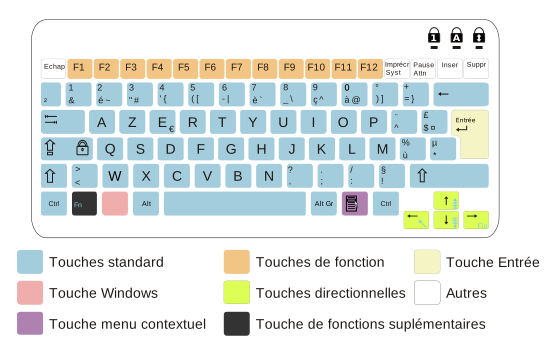
So I can get what I wanted, even if my issue hasn't been really solved, since I can't use the ^ near the P as I would use in other softwares (firefox, vim, evolution, etc).
According to Le Farfadet spatial, the reason why ^ near to the P doesn't work might be a problem in my configurations, and said (I translate) "The fact that Emacs works in console mode is a bit weird. There might be a problem is the general configurations of Emacs in X mode."
If you have any idea, since I would be interested and curious to learn what is the origin of my problem I would be happy to get an answer. If you don't have any idea, or you are not curious or interested to know what is the origin of my problem, then I don't want to bother you, and thank you for all !
オフライン
hmm, I believe the problem caused by keyboards layout(keymap) setting, but I'm not sure why still "^" key does not work properlly..
Can you try following, please?
1-1. Logout
1-2. Select user name to login
1-3. Before type password, check 「キーボード(K)」 is set to "France Layout" (There are too many but some should work fine)
1-4. Then type password and start desktop session.
If it does not work,
type following in gnome-terminal.
sudo dpkg-reconfigure console-data
Then select France Layout.
There are completely different approach.
To use, xmodmap program.
You can modify binding of key-code and key using xmodmap
But I'm not sure how to use that program..
オフライン
1-1. Logout
1-2. Select user name to login
1-3. Before type password, check 「キーボード(K)」 is set to "France Layout" (There are too many but some should work fine)
1-4. Then type password and start desktop session.
I have already done that before posting in french and japanese forums and it didn't work.
If it does not work,
type following in gnome-terminal.
コード:
sudo dpkg-reconfigure console-data
Then select France Layout.
I remember to have also tried this, but in case I was wrong I have redone this, selected "アーキテクチャリストからキーマップを選択", then "azerty", "french", and finally "Same as X11 (latin 1)" (in case it would be one of the other options, I have tried all the others except "Apple USB" since I don't use apple's hardware). But it doesn't work.
There are completely different approach.
To use, xmodmap program.
You can modify binding of key-code and key using xmodmap
But I'm not sure how to use that program..
In fact, since I can get the deadkey ^ and the normal ^ with the trick described in my previous post (that is to say, "(load-library "iso-transl")" in my init.el + the ^ key near the P key to use ^ as a deadkey, and ^ of the 9 key, with AltGr), I don't want to use xmodmap, since it is just another trick.
Actually, my problem has been solved with a trick yesterday, and by now my purpose is only to know what is the origin of my problem because I'm curious and interested in the undestanding of what causes this problem. That's why I don't consider xmodmap since it is a trick (I dont' know if it is clear, but if you don't understand, I can try to clarify)
オフライン
Actually, I'm not sure what is the "^" key's proper behavior in French keymaps.
But, if you think "^" key near the "p" should work as "asciicircum", you can check keycode and keysym of that key using xev.
Then check the keymaps those are located in /usr/share/keymaps/i386/azerty
Some keymap file might contain the proper setting.
Or that behavior might the "specification".
I think it is good to ask somebody who are using azerty keyboard what he/she see pressing "^" key in xev window.
Anyway, now you do not have to rush to investigate about this problem, do you?
If you find out the root cause of this problem someday, let us know, please. :)
Cheers!
オフライン
アドバイザの方、なぜ日本語フォーラムで延々と英語なんですか?
hmatsue :
Anyway, now you do not have to rush to investigate about this problem, do you?
If you find out the root cause of this problem someday, let us know, please. smile
Cheers!
thank you for all !
When I will have a better knowledge related to linux systems, sure ! I will write something !
STGSAGWAN:
アドバイザの方、なぜ日本語フォーラムで延々と英語なんですか?
私に向けていない質問なんですが、失礼しながら答えます。別に現代語を使う機会がなくて、日本語で喋る機会もない。こちらの日本語の知識は足りなくて、そのせいで松江さんがよく分からなかったようですから、英語を使っても構わないと優しく言われて、結局英語で書いました。
アドバイザの方を叱るべからず。私のつまらない日本語のレベルを叱るべきです。英語を使うことでSTGSAGWANを困惑させた場合は謝ります。
オフライン
> STGSAGWANさん
Ubuntuの日本語環境上での問題であることから日本語フォーラムで話題にすることは不適切であるとは考えませんでした。
また、使用言語を英語にしたことについてはIRCミーティングでも英語もしくは日本語が使用されていること、
また、失礼ながら質問者さんの日本語よりは、日本人が英語を使った方がコミュニケーションが上手くとれるのでは無いかと考えて、
英語でのコミュニケーションが妥当と考えてのことです。
私の行動に問題、疑問を感じられたようであれば、管理者への報告フォームから連絡を入れていただければと思います。
オフライン
管理者の小林です。
状況からして、本トピックでhmatsueさんが英語でサポートをされていることは適切だと考えます。
本フォーラムは「Ubuntu日本語フォーラム」という名前ですが、他の言語を母語とする方で、Ubuntuで日本語を使いたい方や、日本語ロケールでUbuntuを使っている方と対話する場合など、英語での投稿が適切な場合もあります。
オフライン

2007年10月11日以降の投稿は、クリエイティブ・コモンズ-表示-継承-3.0 (Cc-by-sa-3.0)で提供されます。
著作権等の他者の権利を不当に侵害するような投稿、特定の個人や団体などへの誹謗中傷を含む投稿、個人情報を含む投稿など、違法性のある投稿は行わないでください。
Ubuntu and Canonical are registered trademarks of Canonical Ltd.